AmneziaWG Server Tools
Install and manage an AmneziaWG server on Debian or Ubuntu: one script sets up the VPN and client configs, an optional web panel manages clients, and an optional proxy makes the traffic look like QUIC, DNS, STUN or SIP to deep packet inspection.
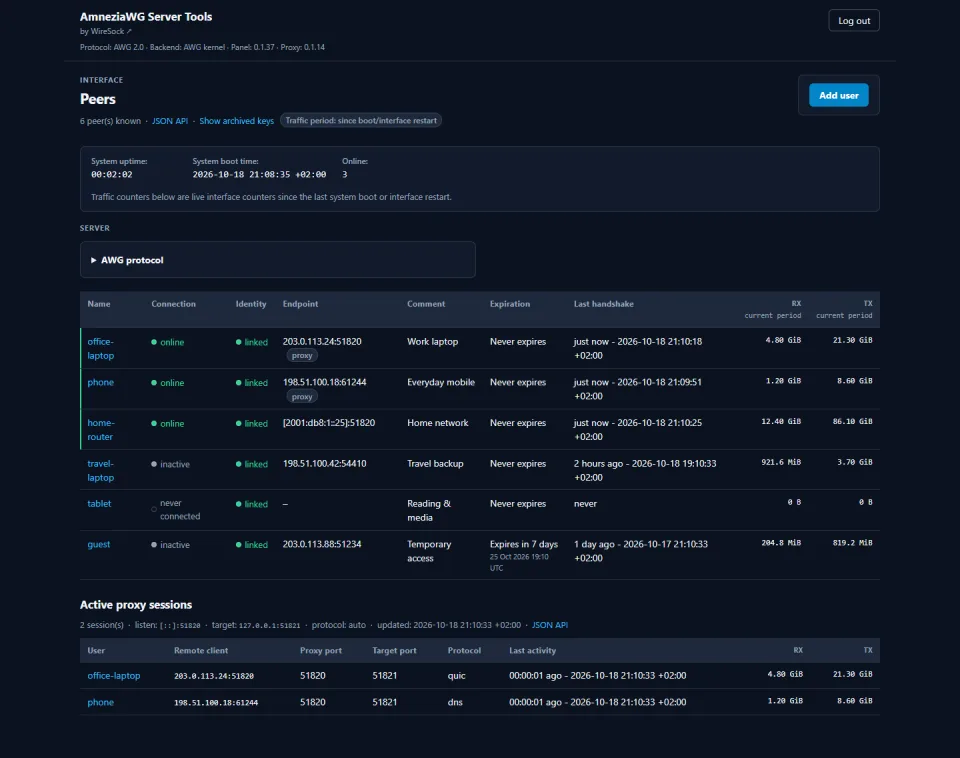
The web panel with demonstration data: client names, addresses and traffic are fictional.
Quick start
Update and reboot the server first. Then download the installer and answer its prompts: it installs AmneziaWG, configures the server and writes a client config you can import into WireSock Secure Connect or any other AmneziaWG client. Run it again at any time to add or remove clients.
curl -fLO https://raw.githubusercontent.com/wiresock/awg-server-tools/main/amneziawg-install.sh
chmod +x amneziawg-install.sh
sudo ./amneziawg-install.sh
Optional: add the web panel
Run it after the VPN is installed. The panel is built from source, so the server needs git and about 2 GiB of free space; --install-rust installs the Rust toolchain if it is missing.
curl -fLO https://raw.githubusercontent.com/wiresock/awg-server-tools/main/amneziawg-web.sh
chmod +x amneziawg-web.sh
sudo ./amneziawg-web.sh install --install-rust
The panel listens on 127.0.0.1:8080 only. Open an SSH tunnel from your computer, then go to http://localhost:8080:
ssh -L 8080:127.0.0.1:8080 user@your-serverNon-interactive installs, a reverse proxy for the panel, the BoringTun backend and every option are described in the README on GitHub.
What's inside
amneziawg-install.shamneziawg-web.shamneziawg-proxy.shBest with WireSock Secure Connect
amneziawg-proxy sits in front of AmneziaWG and answers probes like a real QUIC, DNS, STUN or SIP service. On its own it disguises the server-to-client direction. With WireSock Secure Connect 3.6 or later on Windows, the client disguises its own packets the same way, so traffic in both directions looks like the imitated protocol.
| Mode | What DPI sees | Typical port | Good for |
|---|---|---|---|
quic | QUIC 1-RTT and Version Negotiation | 443 | Networks heavy on QUIC and HTTP/3 (safest default) |
dns | DNS queries and responses | 53 | DNS-filtered networks |
stun | STUN Binding traffic | 3478 | Networks that allow WebRTC and NAT traversal |
sip | SIP signaling | 5060 | Networks that allow VoIP |
The proxy works with AmneziaWG 1.0 and 2.0 only. AWG 3.0 and later use the padding the proxy rewrites as key material, so keep a proxied server on AWG 2.0, the default for new installs.
After the VPN is installed, add the proxy. It moves AmneziaWG to the loopback interface and takes over its public port; run without arguments, it walks you through the settings:
curl -fLO https://raw.githubusercontent.com/wiresock/awg-server-tools/main/amneziawg-proxy.sh
chmod +x amneziawg-proxy.sh
sudo ./amneziawg-proxy.sh
In the Secure Connect profile, set Protocol Masking to the same protocol as the proxy (for example Ip = QUIC), or run the proxy with --protocol auto so it follows each client. With QUIC, also set Jc = 0. Profile parameters
More options
Requirements
- Debian 11 or later, or Ubuntu 22.04 or later (tested on 22.04, 24.04 and 26.04).
- Root access to the server.
- For the BoringTun backend: a VM or bare-metal host with systemd, TUN and IPv6 sockets, on x86_64 or aarch64.
AmneziaWG Server Tools is an independent project and is not affiliated with, endorsed by or sponsored by Amnezia. "Amnezia", "AmneziaWG" and related names are the property of their owners and are used only for identification. The tools are provided as is, without warranty, under the MIT License.